
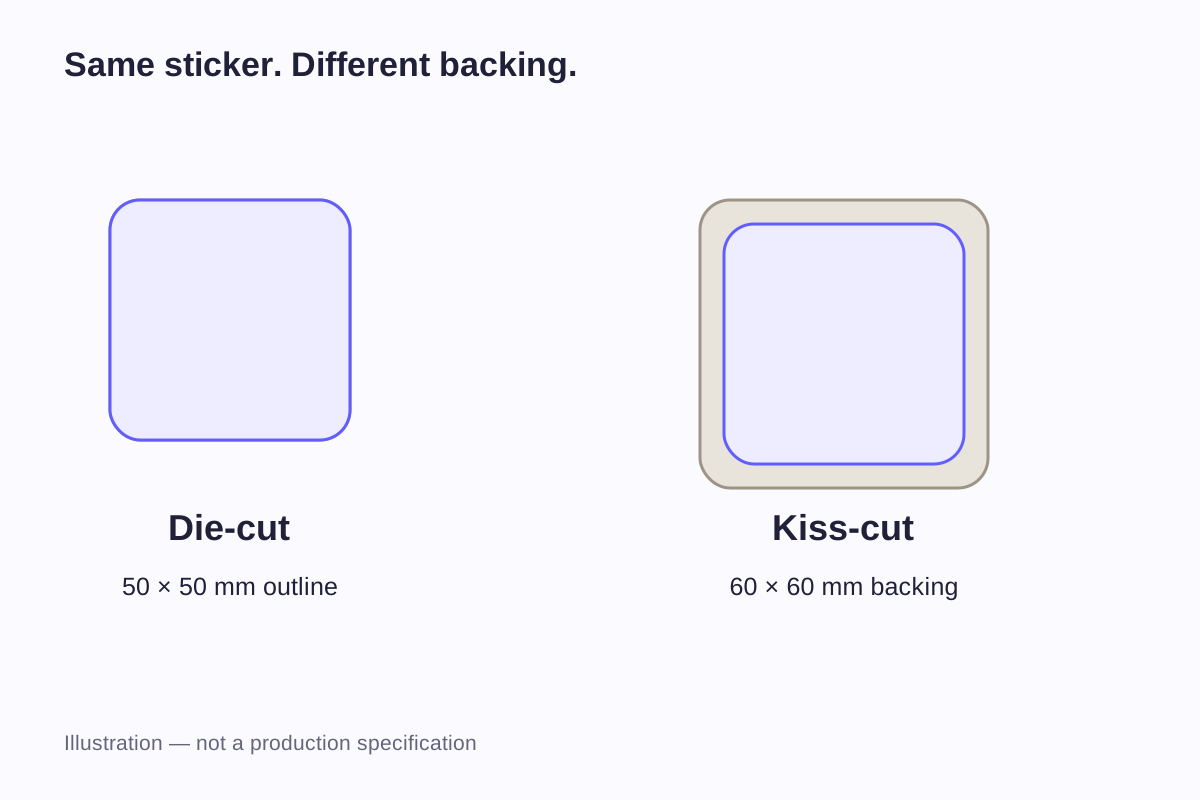
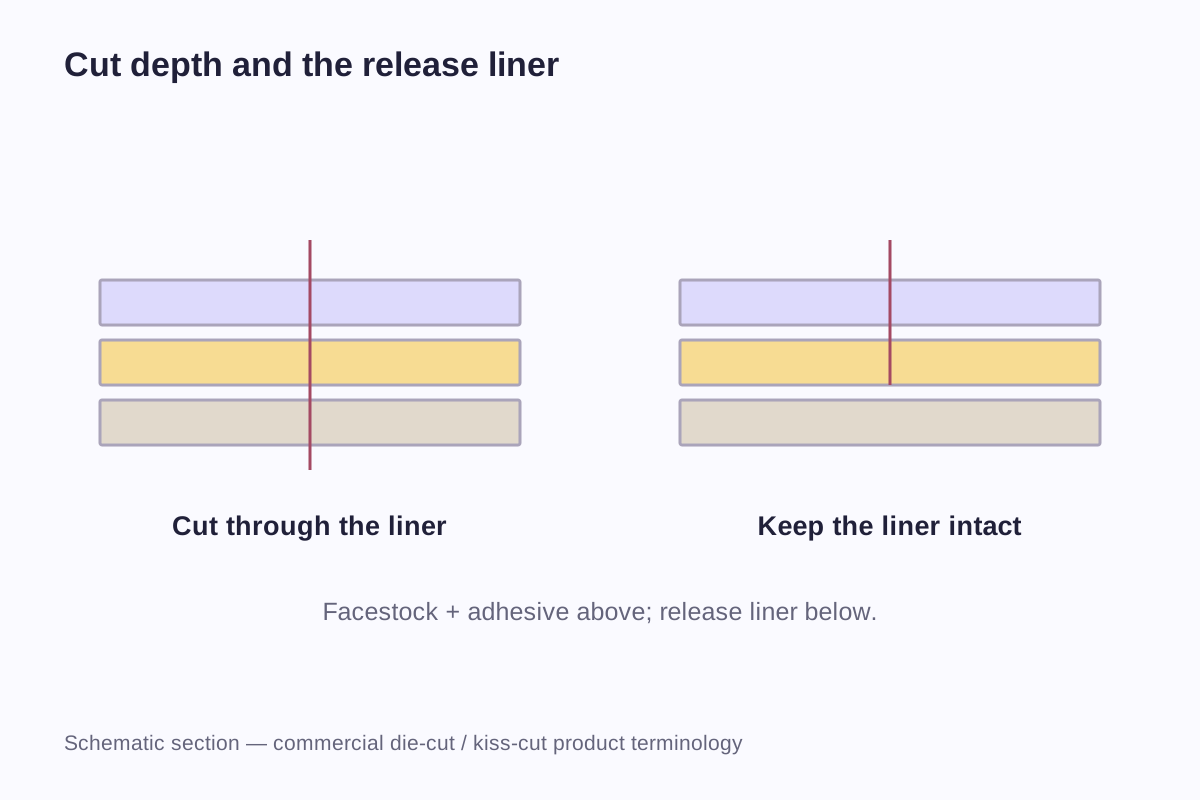
The practical difference between a die-cut sticker and a kiss-cut sticker is what happens to the backing. In sticker catalogs, die-cut usually means the cut passes through both the sticker and its liner. With a kiss-cut, the sticker is cut to shape while the supporting liner remains intact beneath it.
The shape of the artwork is a separate choice. A kiss-cut sticker can have a custom outline, and a die-cut sticker can be a simple circle or square. The two names do not mean “custom shape” and “ordinary shape.”
Start with the layers the cut passes through
StickerApp's cutting explanation and Cricut's sticker terminology distinguish the formats by whether the cut passes through the backing. Suppliers may use the names differently, so a drawing showing the sticker and backing removes ambiguity from an order.
Die-cut: the piece separates through the backing
The finished piece includes the printed sticker and its liner, both cut to the outer shape. Before application, the buyer holds an individual shaped piece. The liner is then peeled away, leaving the adhesive sticker ready to apply.
The cut can follow a logo silhouette or a regular outline. A printed border may still sit inside that edge; cutting through the liner does not remove a border that belongs to the artwork.
Kiss-cut: the sticker separates from a retained backing
The sticker's contour is cut without cutting through the supporting liner. The backing can extend beyond the sticker or carry several separately peelable designs.
This leaves two outlines to describe: the peelable sticker and the backing piece. The backing can be a rectangle or another specified shape. It might hold a single design with a small surrounding margin, or several designs arranged on a larger sheet.
Kiss-cut options vary with the supplier's materials and cutting process. The formats described here explain the industry terms; availability from WiseSticker still depends on the requested shape, backing arrangement and material.
Compare what the buyer receives
| Feature | Die-cut individual piece | Kiss-cut piece on retained backing |
|---|---|---|
| Sticker outline | Defines the peelable shape | Defines the peelable shape |
| Backing outline | Cut through with the outer shape | Can extend beyond the sticker contour |
| Presentation before peeling | The whole piece follows the cut outline | The backing remains visible around or beneath the design |
| Multiple designs | Can be supplied as separate pieces | Can share a backing in an agreed layout |
| Dimensions to describe | Finished sticker dimensions and packing | Sticker dimensions plus backing or sheet dimensions |
| Appearance after application | Determined by sticker material, artwork and contour | Determined by sticker material, artwork and contour |
Once applied, stickers with the same material, print and peelable outline look the same regardless of the backing size. The extra backing matters before that point, when the piece is being packed, held or peeled. It does not become part of the image on the item.
Extra backing gives you somewhere to hold the piece while peeling. How easily the sticker lifts also depends on the cut quality, contour and material, particularly with small designs. A larger backing can help with handling without solving a poorly cut edge or an awkward outline.
Worked example: a 50 mm sticker on a 60 mm backing
The following example puts the same 50 × 50 mm finished sticker into three formats. The artwork and peelable outline stay unchanged, so the differences come from how the pieces are backed and supplied.
| Example format | Finished sticker | Backing or layout | Applied sticker size |
|---|---|---|---|
| Individual piece cut through the liner | 50 × 50 mm | Follows the finished outside outline | 50 × 50 mm |
| Kiss-cut piece centered on a larger backing | 50 × 50 mm | 60 × 60 mm backing | 50 × 50 mm |
| The same design within a set | 50 × 50 mm per sticker | A larger sheet with an agreed arrangement | 50 × 50 mm per sticker |
For the centered second example, the extra backing on each side is:
(60 − 50) ÷ 2 = 5 mm
That 5 mm is simply the difference between these example dimensions. It is not a recommended cut margin, minimum spacing or WiseSticker production specification.
Now suppose the sticker is an irregular logo with a maximum width and height of 50 mm. A 60 mm square backing still gives 5 mm of clearance at its furthest horizontal and vertical points when centered. The space around narrower portions of the contour will be larger. “5 mm border” would therefore be an imprecise description of the entire surrounding area.
For clarity, dimension the sticker and the backing separately. The sticker size guide explains maximum outside measurements for custom contours and the difference between a printed graphic and its finished cut edge.
The outline, the printed border and the backing are different
A white area around a graphic can have more than one explanation. It might be unprinted white face material that remains on the applied sticker. It might be backing outside the sticker. In a flat photograph, those areas can look similar.
The distinction becomes clear when the sticker is lifted. A face-material border leaves with the sticker; an exposed backing margin stays behind. For clear film, an unprinted margin may instead reveal the item beneath it after application.
This is why a product photograph alone is sometimes insufficient for approving the format. A layout showing the print, peelable contour and outside backing edge answers a more precise question: which visible areas will remain on the product?
The cut also does not determine the ink color or surface effect. Paper, white film and clear film can be described independently from their cutting structure. Their suitability for a proposed cut must still be reviewed. The sticker materials guide separates the face stock, adhesive, liner and optional finishing layers.
Choose a format around handling and distribution
Individual handouts and packaging inserts
A separately cut piece shows its outer silhouette as soon as someone picks it up. For handouts or packaging inserts, each recipient can receive one design as an individual piece. Different designs can also be counted into orders without keeping them on a shared sheet.
A larger backing surrounds the peelable design and gives the recipient more space to hold it. That surrounding area may also be intended for a name or instructions. Printing there needs to be part of the order specification, because the backing's suitability for printing on either side cannot be assumed.
Retail sets
A group of designs needs a defined set as well as individual outlines. Which designs belong together? How many copies of each does the customer receive? Is the complete sheet the retail item, or will separate pieces be packed together?
Custom sticker sheets keep designs together in a shared layout. A retail set can also contain separate die-cut pieces in one package. The buyer may receive the same collection of designs either way, but the packaging and the way the designs are peeled will differ.
Repeated use during packing
For someone applying many labels, the supply arrangement affects how pieces are held, counted and removed. A sheet of repeated designs and a stack of individual pieces create different handling tasks.
An internal packing team may care most about peeling and counting, while a retail package may need room for a brand name or instructions. The backing format affects both tasks. Settling it alongside the material and artwork avoids finding at packing time that the pieces are awkward to handle or present.
Fine outlines need attention beyond the cut name
A simple square and a character with narrow arms or a thin tail impose different handling demands. The drawing should show those details at the intended finished dimensions.
Long, narrow extensions
A thin extension can be difficult to support while peeling or positioning. Surrounding backing may help hold the design before use, but it does not make that extension wider after the sticker is removed. The contour, material and handling still need consideration.
Closely spaced parts
Two nearby elements may be one connected sticker or two separate peelable pieces. A visible gap in the artwork does not communicate which result is intended. Mark the cut paths so the supplier can distinguish open printed space from a separation between stickers.
Internal openings
A hole shown inside a logo might mean an unprinted area, a transparent area or material that should be removed. The file needs to distinguish those outcomes. Small openings that must be cut out also need a workable way to remove the waste; showing the cut path makes that requirement clear.
Changes in scale
Reducing a 100 mm-wide graphic to 50 mm halves every proportionally scaled feature. A 2 mm connection becomes 1 mm. That arithmetic does not establish whether either width is producible; it explains why a design that looks uncomplicated on screen may need changes at a smaller size.
A drawing for custom die-cut designs should show the outer dimensions and the narrow or intricate areas clearly. That lets the printer consider the contour together with the proposed material and cutting process, rather than judging it from an enlarged logo alone.
Prepare a file that separates print and cutting instructions
The artwork should make three things distinguishable: the printed design, the sticker cut contour and any separate backing or sheet boundary. Labels on a drawing can explain these elements even before a final production file is prepared.
The supplier's file requirements determine the technical setup, including layer names, spot-color names and export settings. Use the specified cut-line identifiers and bleed allowance, with cutting instructions kept separate from the artwork that will be printed.
Where color reaches the edge, bleed extends the printed image beyond the intended cut. A safety area keeps important content inside it. An exposed backing margin sits outside the peelable sticker. These are three different spaces; one value should not be used to describe all of them.
Include a normal-size preview showing the top of the design. If a larger backing is retained, dimension it separately and identify any surrounding printed area. For several graphics, label each design so its quantity and cut outline remain associated with the correct artwork.
Count stickers, backing pieces and sets separately
An inquiry for “500 stickers” can mean several different things when designs share a sheet. Express the total at the level being purchased, then state its contents.
| Illustrative order description | Number of supplied units | Individual stickers contained |
|---|---|---|
| 500 individual pieces, one sticker per backing | 500 pieces | 500 stickers |
| 500 sheets, each holding six stickers | 500 sheets | 3,000 stickers |
| 100 retail packs, each containing five separate stickers | 100 packs | 500 stickers |
These are counting examples, not MOQ rules. A supplier's quotation should state what is counted and how quantities are divided among designs. In particular, the number of designs is not the same as the number of stickers: a six-sticker sheet might contain six different graphics, three graphics repeated twice or one graphic repeated six times.
The sticker sheet size and layout guide shows how the dimensions and spacing affect the arrangement. The final layout needs to be reviewed before a geometric estimate becomes an agreed production quantity.
Frequently asked questions
Yes. Kiss-cut describes a cut through the sticker that leaves the backing intact; it does not restrict the artwork to a rectangle. A custom contour is possible where the supplier's material and cutting process support it. The order should specify that contour and the backing shape separately.
No. A white border is a design or material feature inside the cut outline, not a consequence of cutting through the backing. The artwork can specify a border, printing to the edge or an unprinted clear margin on suitable transparent material. Those print and material choices are separate from the cutting format.
No. The peelable contour defines the applied size. A 50 mm sticker on a 60 mm backing remains 50 mm after the backing is removed. Larger backing dimensions matter for handling, packaging and presentation before application.
The cut name alone does not establish water resistance. Face material, ink, any finish, adhesive and use conditions determine the relevant performance. Comparing two cutting formats is only meaningful when the rest of the construction is identified too.
Provide the artwork, finished sticker width and height, intended outline, quantity and use. Add separate backing or sheet dimensions where relevant, and state whether designs remain together or arrive as individual pieces. A marked preview is particularly helpful for internal openings, narrow details and mixed-design sets.
Related guides
- Sticker Size Guide: Dimensions in Inches and Millimeters
- Sticker Sheet Size and Layout Guide: How Many Stickers Will Fit?
- Sticker Materials Explained: Vinyl, PET and Paper
Send the artwork, finished sticker dimensions, quantity and how the stickers will be distributed. Show whether you need individual pieces, extra backing around each design or several designs on a sheet.
Discuss Your Die-Cut Design