
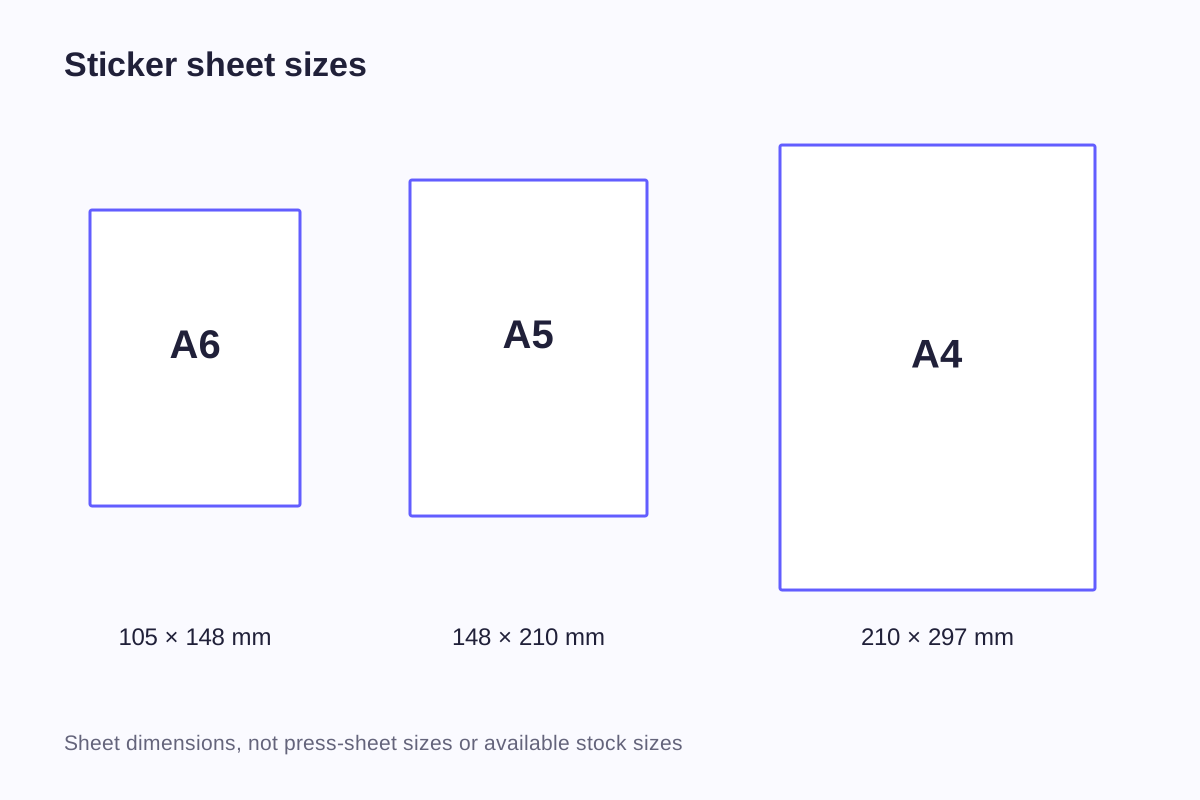
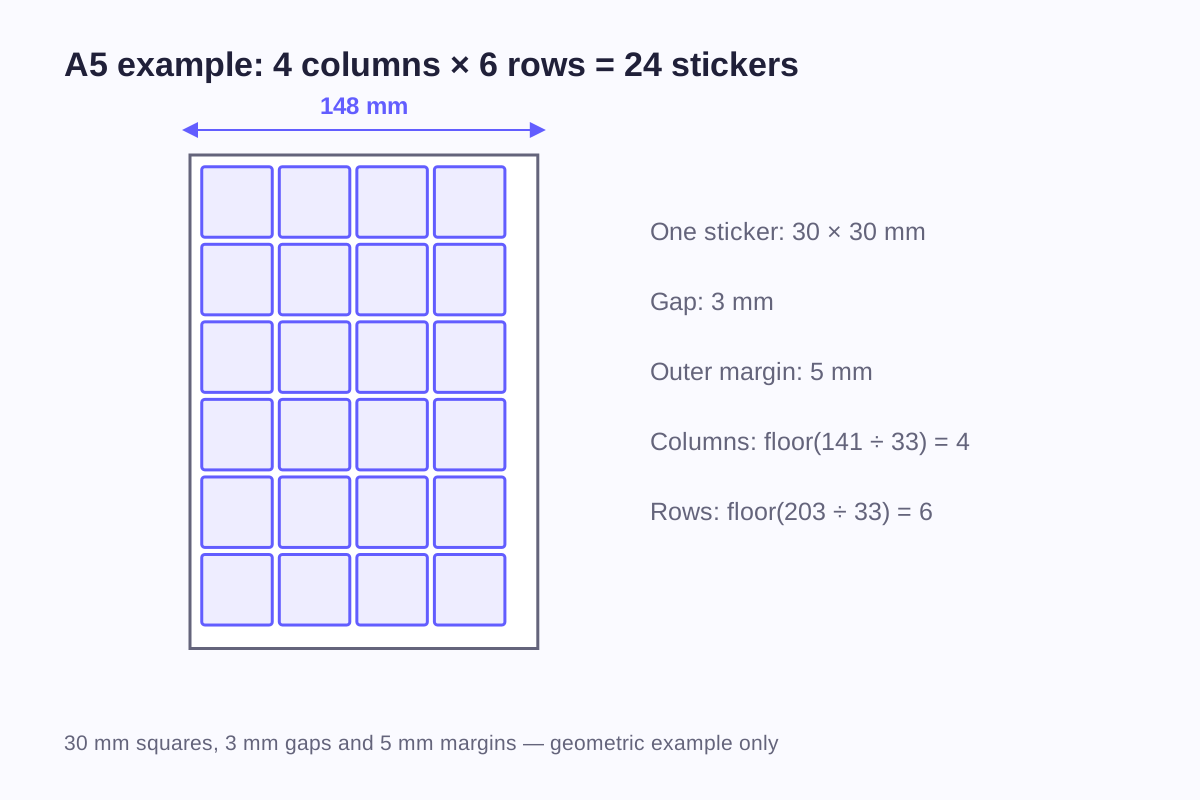
A sheet size alone does not tell you how many stickers will fit. An A5 sheet can hold 24 square stickers measuring 30 × 30 mm in the example below, but that count changes when you add a title, enlarge one design or increase the spaces between pieces. The useful starting point is a layout with dimensions, not a photograph of a crowded sheet.
Treat the sheet as a product with three separate measurements: its outside dimensions, the finished dimensions of each sticker, and the spaces that remain between and around them. That makes it easier to estimate quantities, compare layouts and explain the set you want printed.
Three sizes to keep separate
The finished sheet is the whole item a customer receives. The individual sticker is the shape peeled from that sheet. The printed artwork may extend beyond a sticker's cutting line or leave an unprinted border inside it. Those boundaries do different jobs.
For example, a 30 mm square sticker might contain a 24 mm logo centered inside it. If the design is balanced equally, the logo has 3 mm of space on each side within the sticker. That says nothing about the gap to the next sticker or the outside edge of the sheet.
| Measurement | What it describes | Example in a design brief |
|---|---|---|
| Finished sheet | Overall width and height of the supplied set | 148 × 210 mm |
| Individual sticker | Finished shape after peeling | 30 × 30 mm square |
| Artwork inside the sticker | Logo, illustration or wording | 24 × 24 mm logo |
| Cut-to-cut gap | Distance between adjacent sticker outlines | 3 mm in the geometry example below |
| Sheet margin | Distance from the sheet edge to the nearest sticker outline | 5 mm in the same example |
| Reserved area | Space unavailable to stickers | A title panel above the set |
These labels also prevent a common quotation problem: “500 stickers” could describe 500 individual pieces, 500 sheets or a set containing several designs. An order for 500 sheets with 12 stickers on each sheet contains 6,000 individual stickers. Both numbers belong in the brief, even when the sheet is the unit being purchased.
If you are still deciding how large each design should be, use the single-sticker size guide before calculating a whole sheet. Reducing everything until it fits can leave the smallest lettering unreadable.
Margin, gap, bleed and safe area are different
The sheet margin and the space between stickers describe the arrangement. Bleed and the safe area describe how artwork sits around a cutting line.
Bleed extends background artwork beyond the intended cut. A safe area keeps important text and graphics inside that cut. Neither should be confused with a visible decorative border. An unprinted white border is part of the finished sticker; bleed normally sits outside its finished shape.
OnlineLabels explains bleed and safe margins separately in its custom-printing guidance. Use its figures only for the products described there; the printer handling your order will specify the bleed and safe area for your layout.
Imagine two neighboring stickers with dark backgrounds. Their outlines may be 3 mm apart in a sketch, but the artwork outside those outlines also needs space. The drawing therefore needs more than a visual gap between logos: it needs separate cut paths and a workable print layout. A preview can make the spacing look generous even when the bleed areas overlap.
The 5 mm margins and 3 mm gaps used throughout the following calculation are illustrative geometry assumptions. They are not WiseSticker's minimum cutting gap, bleed allowance or machine requirement.
Calculate a regular grid
For equal rectangular stickers in straight rows, calculate the count along each axis separately. Let:
- L be the sheet dimension along that axis.
- m be the margin at each end.
- s be the sticker dimension along that axis.
- g be the gap between stickers.
For a positive usable area, the count is:
Number along one axis = floor((L − 2m + g) ÷ (s + g))
“Floor” means round down to a whole number. If the result is negative, the count is zero. The extra gap in the numerator accounts for the fact that a row of four stickers has only three gaps between them.
A5 worked example
Use a 148 × 210 mm sheet, 30 × 30 mm stickers, 5 mm margins on all four sides and 3 mm gaps:
Columns = floor((148 − 10 + 3) ÷ 33) = floor(141 ÷ 33) = 4
Rows = floor((210 − 10 + 3) ÷ 33) = floor(203 ÷ 33) = 6
Total = 4 × 6 = 24 stickers
The four-column block occupies 4 × 30 + 3 × 3 = 129 mm. The six-row block occupies 6 × 30 + 5 × 3 = 195 mm. That leaves 19 mm horizontally and 15 mm vertically outside the sticker block. Centering it gives 9.5 mm at each side and 7.5 mm at the top and bottom, both greater than the assumed 5 mm minimum margin.
That leftover space is useful information. It shows where the block can move without changing its count. It does not necessarily provide enough room for an extra row or a large title.
| Finished sheet reference | Width × height | Columns × rows | Calculated count |
|---|---|---|---|
| A6 | 105 × 148 mm | 2 × 4 | 8 |
| A5 | 148 × 210 mm | 4 × 6 | 24 |
| A4 | 210 × 297 mm | 6 × 8 | 48 |
| 4 × 6 inches | 101.6 × 152.4 mm | 2 × 4 | 8 |
Every row uses the same 30 mm stickers, 5 mm margins and 3 mm gaps. These are geometric counts, before equipment marks, cutting requirements, waste removal or packaging features are considered.
Supplier-specific counts can be different for good reasons. For instance, Sticker Mule's sheet guidance gives its own minimum sticker size and spacing alongside its estimates. Those figures describe that supplier's product, rather than a universal capacity for a sheet of paper.
What changes when you add a header?
Suppose the A5 example needs a 25 mm brand header below the 5 mm top margin, followed by another 3 mm gap before the first row of stickers. The height available to the sticker block becomes:
210 − 5 − 5 − 25 − 3 = 172 mm
Five rows occupy 5 × 30 + 4 × 3 = 162 mm. Six rows would need 195 mm, so the revised layout holds 4 columns × 5 rows = 20 stickers.
The header costs four stickers in this arrangement. It does not cost a fixed number on every sheet: a different sticker height or unused space in the original layout could produce another result.
The same approach works for a footer, a product description or a hanging area. Mark the unavailable region first, including any separation it needs from the nearest cut line. Then calculate the remaining rectangle. If a hanging hole is involved, its size and position need to be part of the drawing; placing a hole symbol over the artwork after layout can interfere with a sticker or important wording.
Mixed designs need an arrangement, not just a total area
Dividing sheet area by sticker area gives an optimistic figure because it ignores margins, gaps and the shape of unused spaces. Even when the total area appears sufficient, the designs may not fit together.
Consider two 60 × 30 mm headline stickers and six 30 × 30 mm icons. With 3 mm gaps, the two headlines fit side by side in a 123 × 30 mm row. The icons can form two rows of three in a 96 × 63 mm block. Stacking those blocks with a 3 mm gap creates an overall envelope of 123 × 96 mm. It fits within the A5 example's 138 × 200 mm area inside the assumed margins.
That arrangement is a geometric starting point. You might center the narrower icon block, align it to one side, or use the adjacent space for a small caption. The chosen arrangement changes the visual hierarchy even when the sticker count stays at eight.
Rotating a rectangular design can improve the fit, but it also changes how the sheet is read. A retail set with half its logos sideways may be less convenient to display. For an irregular outline, start with its maximum width and height, then assess whether closer nesting is workable. A narrow empty corner on a drawing is not automatically usable cutting space.
If the distinction between a sticker outline and its surrounding backing is unclear, the die-cut and kiss-cut comparison explains the structures. A supply format and a cutting depth should be described separately.
Material changes how the complete sheet looks
A coordinated set normally uses one selected stock across the sheet. Mixing small and large designs is a layout choice; requesting different physical materials is a different production question.
| Design approach | What to judge on the complete sheet | What to judge after peeling |
|---|---|---|
| Paper or an opaque printed face | Color balance, title space and the relationship between designs | The individual graphic at its finished size |
| Clear film | Contrast against the backing and packaging used to present the set | Contrast against the actual item being labeled |
| Reflective or holographic material | How reflective areas connect the collection visually | How each piece looks as its viewing angle changes |
| A laminated printed sheet | The appearance of the full printed surface | The selected finish with the individual sticker design |
Keep a title or instruction block readable against its actual background. A pale caption may be easy to see in an artwork file displayed on white yet disappear visually in a transparent or reflective presentation. The sticker materials guide separates the face stock from printing, lamination and backing so those choices can be described precisely.
WiseSticker offers paper, vinyl and PET for custom sticker sheets, with printing, layout and packing developed for the order. A finished sample is useful for seeing the set together, especially when the material's appearance is part of the design.
The retail sheet is not the production sheet
An A5-sized item supplied to the buyer does not establish the size of the material loaded into the printing or cutting equipment. Several finished sets may be printed or cut together on larger stock. The production layout can also include marks and edge areas that are trimmed away before delivery.
Keep your specification focused on the product you need: overall finished dimensions, the pieces on each sheet, their sizes, and any retained printed areas. The production team can then prepare an appropriate manufacturing layout around it.
Packaging adds another boundary. A 148 × 210 mm finished sheet is not automatically a comfortable fit in a package described with the same outside dimensions. The useful internal space, seams, closure and any backing card all matter. Compare a finished sheet with the proposed package rather than assuming that two identical nominal measurements guarantee a fit.
A sheet intended for a gift bag may prioritize a compact outside size. A retail set may benefit from a visible header and room for product information. These uses can justify fewer stickers on the same sheet. The highest possible count is not always the most useful finished product.
Turn the layout into a clear order description
A useful description might read: “A5 finished sheets, 20 stickers per sheet, five rows of four 30 mm squares, with a 25 mm printed header; 500 finished sheets.” Attach a layout showing the assumed gaps and margins rather than leaving those details inside a sentence.
For a mixed set, list each design and how often it appears. Ten different designs appearing once each are different from five designs repeated twice, even though both sets contain ten stickers. Artwork versions also need clear names so a revised icon does not accidentally sit beside an old version of the same logo.
The sticker sheet layout reference contains the four worked grids and the per-axis formula used above. It is a static reference: changing a dimension does not automatically update its counts. Recalculate for your own dimensions and mark any reserved areas on the drawing. If you need separately supplied shaped pieces as well as the sheet, describe those as a separate item in the die-cut sticker inquiry.
Frequently asked questions
No. The sheet areas are related, but a particular layout must fit whole rows and columns. Margins, gaps and the orientation of rectangular stickers can change the result. The 30 mm example gives 48 on A4 and 24 on A5; that ratio should not be carried over to another design without calculating it.
Yes, a proposed set can contain different outlines and sizes. Its drawing should show each finished shape, position and quantity. Very small details or tightly packed contours may affect the cutting arrangement, so the complete layout needs assessment rather than only the overall sheet dimensions.
State the finished cut size as the sticker size. Show bleed separately in the artwork according to the production requirements. Otherwise, a 30 mm finished sticker can be confused with a larger artwork box that includes material intended to fall outside the cut.
Not necessarily. Write both the number of finished sheets and the number of pieces on each sheet. WiseSticker's standard minimum is 500 pcs, and the quotation must identify the counting unit for the proposed set. Do not assume that a sheet containing many designs automatically meets an order minimum.
Use them as layout estimates for the example dimensions. The download contains calculated grid examples and a formula, rather than an automatic calculator. Recalculate when your dimensions change, then allow for print marks, cutting details and waste removal. The final sheet drawing and quotation establish the supplied arrangement and quantity.
Related guides
- Sticker Size Guide: Dimensions in Inches and Millimeters
- Die-Cut vs Kiss-Cut Stickers: Backing, Shape and Layout
- Sticker Materials Explained: Vinyl, PET and Paper
Send the sheet dimensions, artwork and number of sets you need. Include the finished size of each design and any space reserved for branding or packaging.
Discuss Your Sticker Sheets