
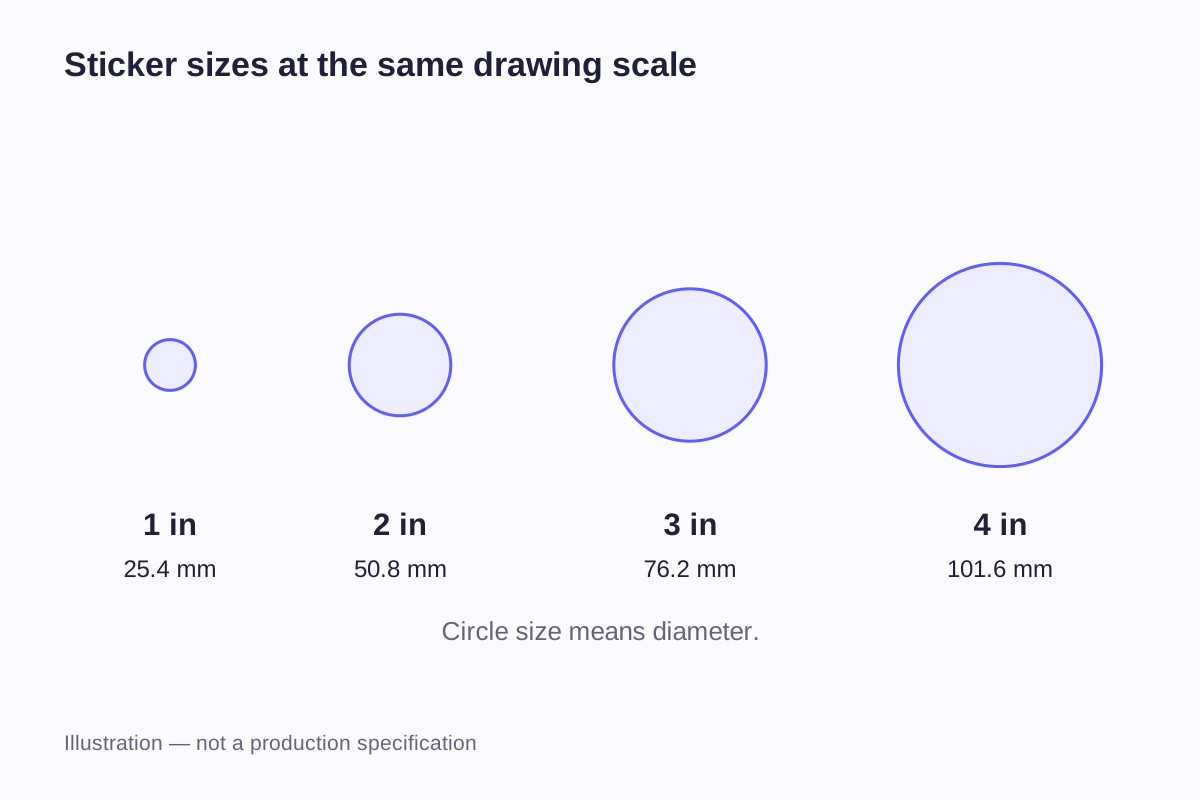
A 3-inch sticker could be a circle, a square or a long, narrow logo. Those three designs occupy different amounts of space, even when their longest dimension is identical. Before picking a size from a menu, decide what the measurement describes and where the finished sticker will sit.
For most shapes, the finished width and height describe the sticker's size; for a circle, use its diameter. The printed image, surrounding border and backing sheet can each have different dimensions. Keeping them separate lets you compare the part that will stay on the item with the backing you will peel away.
Sticker dimensions in inches and millimeters
One inch equals exactly 25.4 millimeters. The table below converts example dimensions so you can compare sizes in either unit. These are reference sizes, not WiseSticker production limits; the artwork still has to work at the chosen size.
| Dimension in inches | Exact dimension in millimeters | If it describes a circle | If it describes a square |
|---|---|---|---|
| 1 in | 25.4 mm | 25.4 mm diameter | 25.4 × 25.4 mm |
| 1.5 in | 38.1 mm | 38.1 mm diameter | 38.1 × 38.1 mm |
| 2 in | 50.8 mm | 50.8 mm diameter | 50.8 × 50.8 mm |
| 2.5 in | 63.5 mm | 63.5 mm diameter | 63.5 × 63.5 mm |
| 3 in | 76.2 mm | 76.2 mm diameter | 76.2 × 76.2 mm |
| 4 in | 101.6 mm | 101.6 mm diameter | 101.6 × 101.6 mm |
| 5 in | 127 mm | 127 mm diameter | 127 × 127 mm |
A 2-inch square and a 2-inch circle share the same maximum width and height. They do not offer the same layout area: the circle loses the corners that a square provides. Text near those corners may fit on the square but fall outside the circle.
The difference between 2 and 3 inches is also larger than it sounds. A square increases from 4 square inches to 9 square inches, or 2.25 times the area. A circle grows by the same area ratio when its diameter increases from 2 to 3 inches. That extra space can accommodate a more open layout, but it does not mean every graphic should simply be enlarged by the same amount.
Keep one unit throughout the brief. If the intended width is 75 mm, write 75 mm rather than rounding it to “about 3 inches.” Three inches is 76.2 mm; the 1.2 mm difference may matter when the sticker must fit a defined panel or recess.
How to measure each sticker shape
The outer cut line defines the finished sticker. Measure that line independently from the artwork inside it and from any backing retained around it.
| Shape | Dimension to give | Example notation | Detail worth including |
|---|---|---|---|
| Circle | Diameter | Ø 50 mm | Identify the outside cut edge, not an inner printed circle |
| Square | Width × height | 50 × 50 mm | Show rounded corners if they are part of the outline |
| Rectangle | Width × height in viewing orientation | 70 × 30 mm, landscape | Mark the top of the design |
| Oval | Maximum width × maximum height | 60 × 40 mm | Supply the outline if it is not a regular ellipse |
| Custom shape | Maximum outside width × maximum outside height | 75 × 42 mm | Include the contour and any narrow extensions |
For a custom outline, imagine the smallest upright rectangle that surrounds the complete sticker. Its width and height describe the overall size. This is also how StickerYou explains the maximum dimensions of uploaded custom shapes in its sticker size guide.
A long logo needs two measurements
“Make this 3 inches” leaves room for interpretation. For a horizontal wordmark, does that mean the total width, the height of the lettering or the length of a diagonal graphic?
Write “76.2 mm wide, height proportional to supplied artwork” if width is the fixed requirement. Once the outline is prepared, record the resulting height too. A 76.2 × 18 mm wordmark will occupy a very different area from a 76.2 × 76.2 mm badge.
Include the border in the finished dimensions
A visible border around a design belongs inside the final cut shape. If a rectangular printed graphic measures 50 × 30 mm and has a 2 mm border on every side, the outer rectangle measures 54 × 34 mm.
That calculation is an illustration, not a recommended production border. With an irregular contour, the exact outside dimensions depend on how the border follows the shape. The drawing should show the finished edge rather than leaving the supplier to guess whether the stated size includes the border.
For custom die-cut stickers, the outline can follow a logo or illustration closely, or provide a regular frame around it. The choice changes the visible boundary without requiring the printed logo itself to change shape.
Find the area the sticker can actually occupy
An item's overall dimensions rarely describe its usable labeling space. A box has folds; a bottle has shoulders; a laptop has hinges, ports and existing marks. A sticker may fit within the object's width and still cover something it should leave visible.
Avery's label sizing guidance considers both the amount of text and the container's shape. For bottles and jars, it focuses on the straight portion available for labeling. Two jars with the same capacity can have different shoulders and proportions, so a recommended size for one jar may not fit the other.
Packaging panels
Measure the actual face of the assembled package. A flat box drawing can include flap areas and folds that disappear or change position after assembly. Existing product information, opening features and windows also reduce the area available to the sticker.
Mark those features on a photograph or simple sketch. A dimensioned rectangle around the intended placement is more useful than a photograph with no scale. If the package will be used in several sizes, measure each version rather than assuming the same sticker has equal clearance on all of them.
Bottles and other curved items
Separate the height of a straight-sided labeling band from the bottle's total height. The shoulder and rounded base can change the way a rectangular label meets the surface.
For a small front label, a paper mockup shows how much of the design remains visible from the front. For a full wrap, the circumference and any intended seam gap become relevant. A tapered container needs its own layout assessment; a rectangle calculated for a straight cylinder does not describe that geometry. The roll label specification guide covers a cylindrical wrap calculation alongside the roll dimensions needed for supply.
Equipment, laptops and promotional objects
Draw the clear area between fittings and existing information. A sticker on a lid may have plenty of room when the item is closed but become obscured when it is opened or placed in a holder.
The sticker needs to stay visible in the item's normal position during use. For larger graphics, the car and window decal size guide covers the available space, installation side and viewing position.
Worked example: an 80 × 60 mm panel
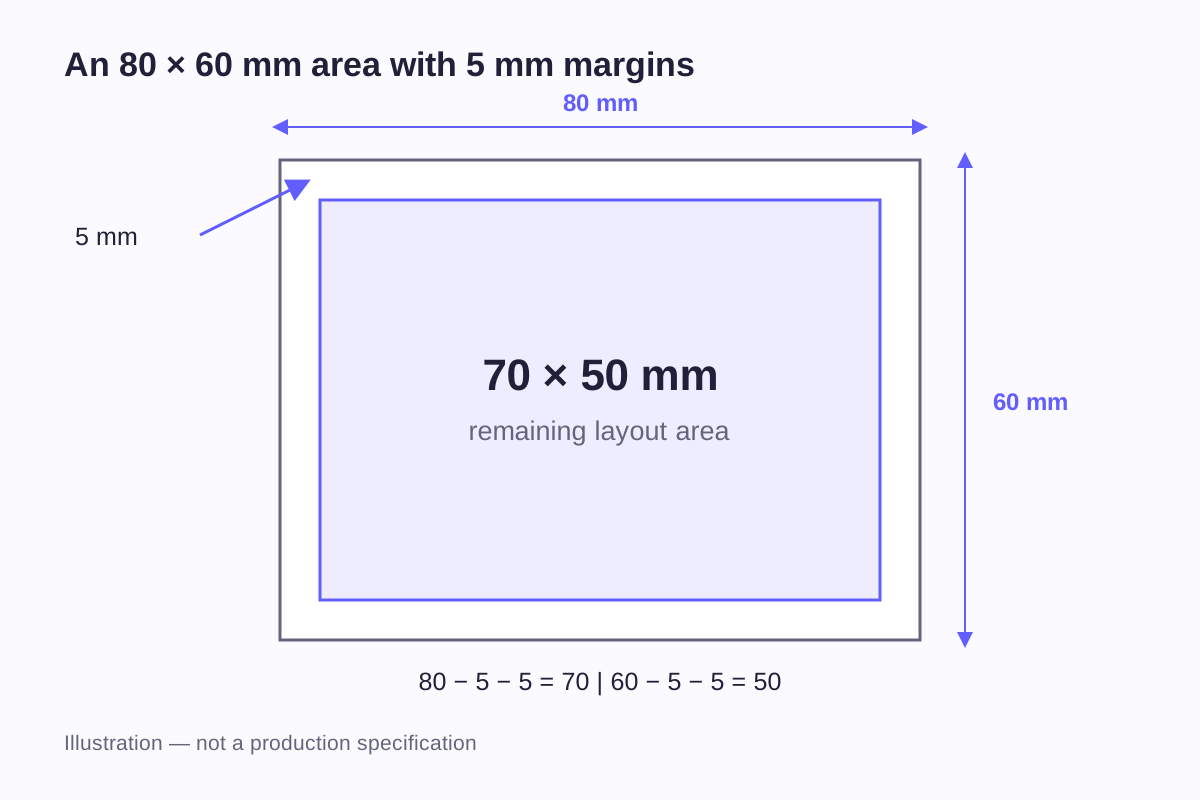
Suppose a package has a flat panel measuring 80 mm wide and 60 mm high. For this example, you decide to leave 5 mm of visible package around the sticker on all four sides.
The maximum rectangular area within that chosen clearance is:
- Width: 80 − 5 − 5 = 70 mm
- Height: 60 − 5 − 5 = 50 mm
The 5 mm is a layout assumption for this example. It is not a factory cutting margin, required bleed or minimum distance from a package edge.
Now consider a horizontal logo whose original proportions are 60 × 40 mm. Enlarging it to 70 mm wide uses a scale factor of 70 ÷ 60 = 1.1667. Its proportional height becomes about 46.7 mm, so it fits inside the 70 × 50 mm area.
| Treatment of the 60 × 40 mm logo | Resulting size | What happens |
|---|---|---|
| Keep the original size | 60 × 40 mm | More package remains visible around it |
| Enlarge proportionally to 70 mm width | 70 × 46.7 mm, approximately | Fits the chosen area without stretching the logo |
| Enlarge proportionally to 50 mm height | 75 × 50 mm | Exceeds the chosen width by 5 mm |
| Force the artwork into a 50 mm square | 50 × 50 mm | Changes the logo's proportions |
There is another option: use a 50 × 50 mm square sticker and keep the logo proportional inside it. At 50 mm wide, the logo becomes about 33.3 mm high. If centered vertically, it leaves about 8.3 mm above and below. A square sticker does not require a square logo.
This example treats the logo as a simple bounding rectangle. A real layout must also account for the cut border and any supporting text.
Scaling changes the small details too
When a complete design is reduced to 75% of its original size, every scaled element becomes 75% as large. A 4 mm-high line of lettering becomes 3 mm high; a 2 mm space between elements becomes 1.5 mm.
Those figures describe geometry, not guaranteed print readability. Letter shape, line weight, contrast and the chosen process also matter. There is no single sticker width that makes all text readable.
The main message and logo establish the layout. Supporting text still needs enough room to read. Moving a crowded line or reducing its wording may solve the problem without enlarging the entire design. A larger sticker is another option when the artwork already uses the available space.
The viewing distance matters too. A logo on an item held in the hand has a different job from wording read on a package sitting on a shelf. Enlarging both designs to fill a computer screen hides that difference, so view the mockups from their intended reading positions.
Equal dimensions can look different on different materials
A 50 mm clear sticker, a 50 mm white sticker and a 50 mm holographic sticker can have the same physical outline while presenting different visual boundaries.
On clear material, unprinted areas allow the item behind the sticker to remain visible. On a white face, the surrounding white area becomes part of the visible shape. A reflective material introduces a changing background around the printed design. These are appearance differences, not changes in measured width.
When comparing custom sticker options, keep the artwork and outline constant for the first comparison. Otherwise, it is difficult to tell whether a stronger visual presence comes from a larger sticker, a different background or a heavier printed border.
Check the fit with a paper template
Use the printable sticker size sheet to compare outlines away from the screen. Print at 100% or “actual size,” with automatic fit-to-page scaling disabled. Measure the sheet's calibration line before cutting anything out.
If a line intended to measure 100 mm prints at 97 mm, the output is only 97% of the intended size. A nominal 50 mm shape on that page would measure 48.5 mm. Correct the print setting and print again rather than adjusting the sticker dimensions to compensate.
Cut out the relevant shape, position it on the item and look at it from the normal viewing position. For a custom design, print the artwork at its proposed width and height as well. The blank outline checks space; the printed mockup checks the arrangement of the content.
Paper shows size and layout, but its feel and behavior differ from sticker film. Adhesion, flexibility, transparency and surface finish need to be judged on a sample made from the proposed material. The paper mockup and the material sample therefore serve different purposes.
For a set containing several designs, the single-sticker dimensions are only part of the brief. The sticker sheet layout guide explains the additional sheet size, spacing and design-count decisions.
Put the dimensions into one clear brief
An ordering note can be short while still separating all the relevant measurements. For the panel example above, it might read:
“Custom-shaped logo sticker, maximum finished width 70 mm and height approximately 46.7 mm, proportional to the supplied 60:40 artwork. Dimensions include the final cut outline. Intended placement: centered on an 80 × 60 mm flat package panel. All measurements are in millimeters. Supporting photograph shows the panel and surrounding folds.”
If the cut border changes those dimensions, revise the drawing before the size is agreed. Include the quantity and supply format separately so they cannot be confused with the number of designs or the size of a backing sheet.
Frequently asked questions
It needs a shape or a second dimension to be clear. For a circle, 2 inches normally describes the diameter. For a square, write 2 × 2 inches. For a rectangle or custom shape, give both width and height, or identify one fixed dimension and state that the other must remain proportional to the artwork.
Give its maximum width and the proportional height, including the final outline. “75 × 18 mm, landscape” is clearer than “75 mm logo.” Check the smallest lettering within that shape; the overall width alone does not indicate how much usable space the text has.
Not always. A backing sheet may extend beyond the peelable sticker or hold several stickers. Identify the finished cut size and backing or sheet size as separate measurements. Once the backing is removed, its dimensions do not contribute to the size of the sticker on the item.
Print dialogs often scale a page to fit the printer's printable area. Select actual size or 100%, then measure the calibration line. Browser zoom and screen size also change how a webpage image appears, so a picture on screen is not a reliable physical ruler.
It can, if the outline fits every intended placement and the design remains readable on each package. Measure the smallest usable area first, then try the same paper mockup on all versions. A larger package may benefit from a different arrangement even when the smaller sticker physically fits.
Related guides
- Sticker Sheet Size and Layout Guide: How Many Stickers Will Fit?
- Roll Label Specifications: Size, Core, Diameter and Unwind Direction
- Car and Window Decal Size Guide: Placement and Viewing Side
Send your artwork or reference image, the measured space on the item and an estimated quantity. We can discuss the finished outline, material and supply format.
Discuss Sticker Dimensions